
Table of Contents
Google has launched a Robotics plugin for Antigravity that brings hardware setup, MuJoCo simulation, and robot control into one development environment. Paired with Gemini 4 Hydrogen, the plugin lets developers use conversational instructions to configure a supported arm, build a simulated workspace, and run applications on physical hardware.
The release connects several jobs that typically require separate tools: installing drivers, calibrating cameras and arms, constructing simulations, writing controllers, and building an application interface. Google says the combined workflow can take a developer from an unconfigured robot to a working application in an afternoon.
Hydrogen, introduced the previous week, supplies the spatial reasoning and code generation behind that workflow. Given a plain-language goal and camera images, it can plan actions, write and execute control code, and adjust its approach using visual feedback.
From Hardware Setup to Simulation
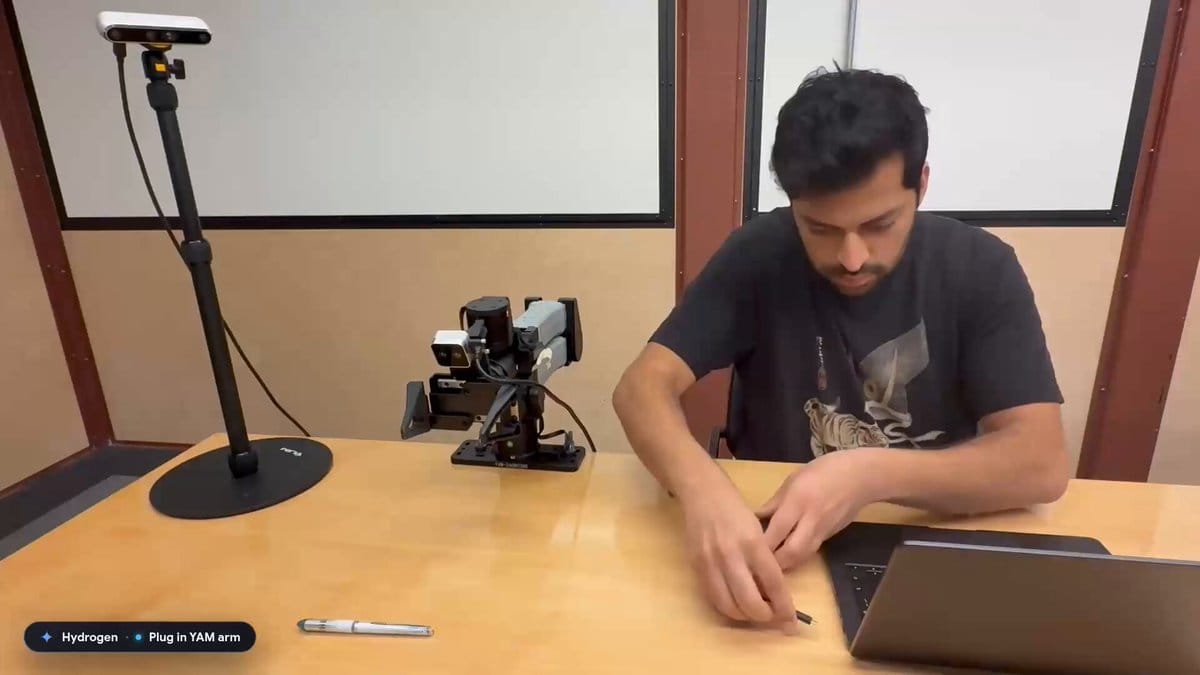
The plugin's hardware onboarding skills install software, discover cameras, calibrate an arm, and check its motion. In Google's demonstration, an I2RT YAM arm and an external depth camera were calibrated and ready for tasks in about 10 minutes after being connected to a laptop. Google also demonstrated setup flows for the low-cost SO-ARM101 and the industrial FR3 Duo.
Once an arm is running, developers can ask it to perform simple tasks, such as picking up a pen or stacking snacks, before building a more involved application.
MuJoCo, the physics simulator integrated into Antigravity, provides a place to develop that application before running it on hardware. Developers can generate scenes from descriptions, product links, documents, or photos of a workspace, then change object shapes, positions, and physical properties through chat. Google's term for this conversational editing process is "vibe sim."
The workflow runs from real-world observations to a simulated scene and back to the physical robot. The agent writes a controller, tests it in MuJoCo, and uses the same code on the arm. Simulation gives developers a way to inspect reaching and grasping behavior and revise the setup alongside their application code. The plugin also supports simulation-only work, so developers can build and test scenes without owning a robot.
Sorting Snacks and Packing Orders
Google's launch demonstration includes a conveyor-belt sorter built from a whiteboard sketch and images of a real workspace. Hydrogen constructs an interactive MuJoCo scene, tests the grasping behavior across multiple runs, and then deploys the controller to an arm sorting snacks into bins.
Google reports that the process took about an hour from start to finish. After deployment, the developer can request changes in natural language, including adjustments to gripper closure force or sorting rules.
A second demonstration connects a web storefront to two YAM Pro arms. Hydrogen builds the store interface, while the arms fulfill incoming orders by setting out a packing bin, selecting mint and citrus soap bars, and retrieving a printed thank-you note. That example extends the workflow beyond manipulation, linking customer-facing software with physical order handling.
The FR3 Duo demonstration uses the same development pattern for chess, creating a simulated board before playing against itself or a human opponent.
Hydrogen's Control and Spatial Reasoning
Hydrogen combines robotic control with embodied reasoning: interpreting objects, camera viewpoints, and possible movements in three-dimensional space. Its closed-loop control uses observations after actions to guide subsequent steps, rather than treating a task as a fixed sequence of commands.
Google reports a score of 58 on Artificial Analysis Robotics 0.1, comparable to Gemini 4 Argon at a lower cost per token. The benchmark tests a physical arm across eight tabletop tasks, including pouring a drink, packing blocks, matching shapes, and measuring a box. Its score is a mean task score out of 100, with partial credit for incomplete tasks, rather than a percentage of tasks completed successfully.
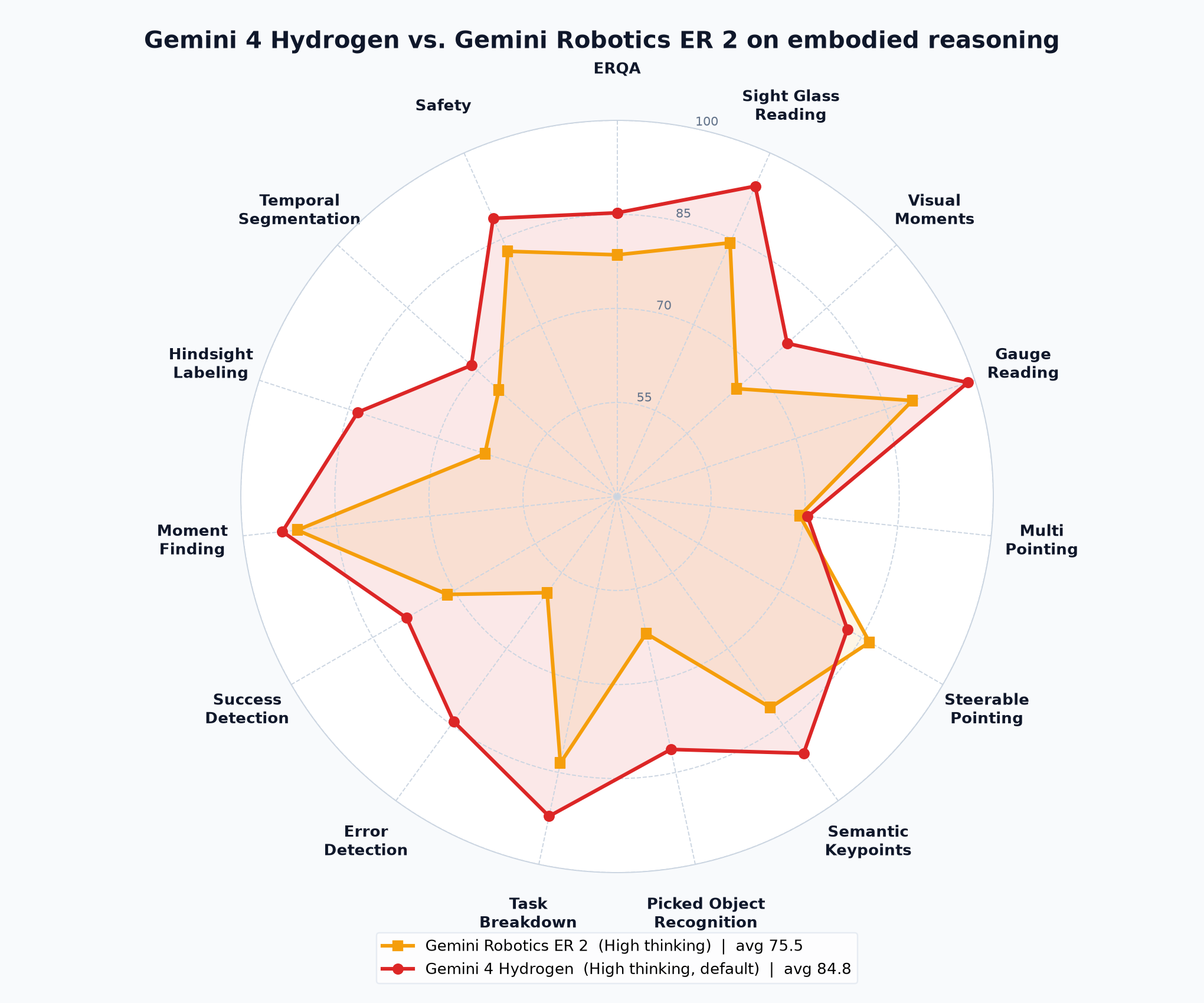
On the public ERQA benchmark, Google reports that Hydrogen outperforms Gemini Robotics ER 2 on spatial reasoning tasks, including matching information across camera views and reasoning about three-dimensional trajectories. Google recommends that developers using ER 2 try Hydrogen for those workloads, bringing capabilities previously associated with its specialized embodied-reasoning models into the general Gemini 4 series.
Availability and Installation
Developers can install Robotics through Antigravity's Customizations menu by searching the Build With Google shelf, then select gemini-4-hydrogen. Access to Antigravity requires a paid Google AI Pro or Ultra subscription.
The plugin is open source on GitHub under Apache 2.0. Third-party software, robot models, and services called by its skills retain their own terms.
The marketplace version bundles seven MuJoCo skills covering Python use, specification editing, rendering, acceleration, simulation parity, Studio, and the graphical interface. Developers installing from GitHub need to install the MuJoCo skills separately; skills that call Gemini perception models also require a GEMINI_API_KEY environment variable.
Hydrogen is also available through the Gemini API's Interactions API, with support in the google-genai SDKs, and through Google AI Studio for spatial prompts, live camera streams, and structured tool calls.