
Table of Contents
Hippius, the distributed cloud platform operating on Bittensor Subnet 75, has launched Shared Accounts, letting teams manage infrastructure through individual logins with separate permissions for each cloud product. Resources remain under one account owner, with usage charged to that account rather than to the teammate who deploys them.
The feature covers virtual machines, databases, Kubernetes, GitHub Actions runners, S3-compatible storage, and content delivery. An owner can give a developer control over one service while limiting another to read-only access or hiding it entirely, replacing the practice of passing a single account password among staff and contractors.
The launch adds team administration to a product suite that recently expanded with AMD SEV-SNP Confidential Compute, an S3-backed CDN, and a CDN firewall running inside confidential VMs. Shared Accounts govern who can operate those services without transferring ownership of the infrastructure.
Per-Product Permission Levels
Shared Accounts use three permission levels, assigned independently across the supported products. Higher levels include the permissions below them.
| Role | Access |
|---|---|
| Viewer | See existing resources, their status, and their settings without changing them. |
| Operator | Perform supported actions on existing resources, such as restarting a VM or database, uploading and deleting S3 objects, or purging a CDN cache. |
| Admin | Create, delete, and configure resources, including S3 buckets, CDN zones, and compute settings, subject to owner-only operations. |
The distinction between Operator and Admin is operational rather than simply read versus write. An S3 Operator can delete objects but cannot administer buckets and access keys. A CDN Operator can purge cached content and recheck a domain's DNS, while a CDN Admin can manage zones, custom domains, rules, and spending caps.
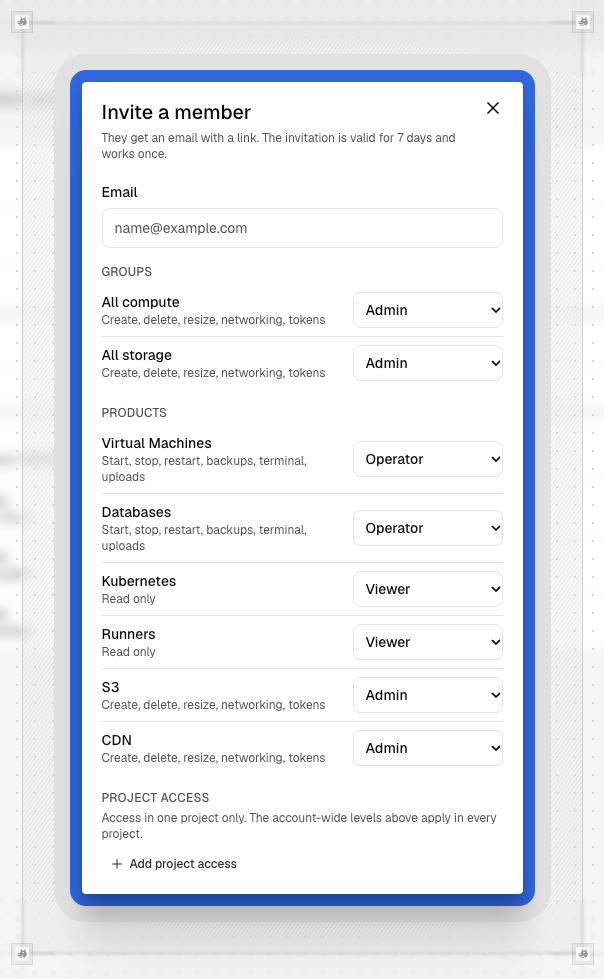
CDN permissions must be granted separately. Neither the All compute group nor All storage includes them. Creating a CDN zone backed by a private bucket also requires S3 Admin access because that operation creates a read key for the bucket. Someone permitted to manage delivery does not automatically gain authority to expose private storage.
This lets owners match access to a person's work. A backend engineer could operate VMs and databases without seeing S3, while a frontend developer could administer delivery settings without receiving control over compute. Products with no access disappear from the member's sidebar.
The permissions are product-level roles rather than a full identity and access management system. Teams needing rules for individual buckets or keys must address those requirements separately; selecting a role does not express that finer-grained policy.
Ownership, Billing, and the Audit Trail
Everything a member creates belongs to the owner's account. Compute deployments count against its quotas and balance requirements, and removing a member leaves their resources intact. The team can withdraw access without deleting the infrastructure that person built.
Some authority remains restricted even when a member has Admin access. Only the owner can create a Kubernetes cluster because it is bound to its creator's key file. Opening the cluster's kubeconfig and backups, along with certain key-signed node operations, also remains owner-only. A Kubernetes Admin can still perform supported management actions, including deleting the cluster.
Database credentials need a separate handoff. Passwords, certificates, and backup keys are shown once to the person creating or restoring the database. If a teammate performs that operation, the owner does not automatically receive those credentials, so they need to be stored somewhere the appropriate team members can access.
Two additional permissions separate personnel administration from billing visibility. Manage the team allows invitations, membership changes, and access to the audit trail. A delegated manager can grant only permissions they hold, cannot change their own access, and cannot change or remove a member whose permissions exceed theirs.
Billing permission provides read access to balances, invoices, and usage; it does not itself authorize payments. Adding funds remains an owner action unless a member is separately appointed a billing administrator for a billing account. Buying, changing, or canceling S3 and Drive plans remains owner-only, and nobody can remove the owner or alter the owner's access.
The audit trail records team changes and successful changes made by members, along with who acted, when, and the affected resource where applicable. It also records actions such as opening a VM's browser terminal and creating an S3 upload link. The owner's own product actions are not recorded in this team audit trail.
Shared Infrastructure and Shared Files Stay Separate
Shared Accounts do not include Hippius Drive. Members retain their personal accounts and switch between them and team accounts from the profile menu; Drive is hidden while they work inside another person's account.
File collaboration instead uses Shared Drives, which scope access to a drive or folder rather than cloud infrastructure. Its Viewer role allows opening and downloading files, Editor adds uploading and editing, and Manager adds inviting and removing members.
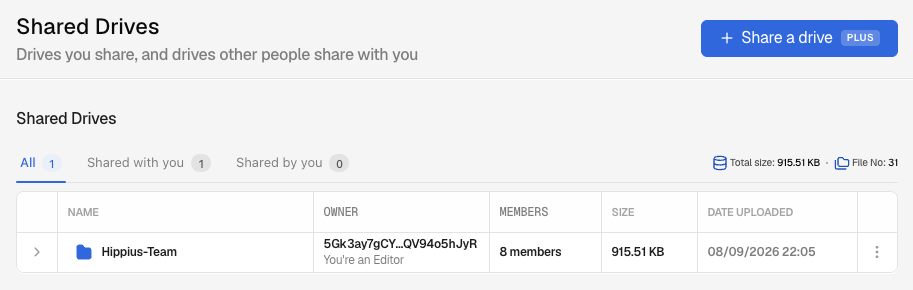
Files in Shared Drives are encrypted on the uploading device, and Hippius does not hold the encryption key. Joining a shared drive is free on any plan, while the owner needs a Plus, Max, or Scale plan to share. A team can therefore use Shared Accounts for developers operating its services and Shared Drives for the documents and designs surrounding that work, with separate invitations and permissions.
To add an infrastructure teammate, owners open Team → Members → Invite member in the Hippius console, enter an email address, and select product roles and any additional permissions. Invitations are single-use, expire after seven days, and are replaced if the same address is invited again. The default limit is 50 members and pending invitations combined.
The Shared Accounts documentation also covers API access. Members use their own token and identify the shared account through the Hippius Account header. Removing a member on the Team page revokes their account access in one step; returning requires a new invitation.